Arcade Game Text Effects: Unlocking Retro-Modern Design
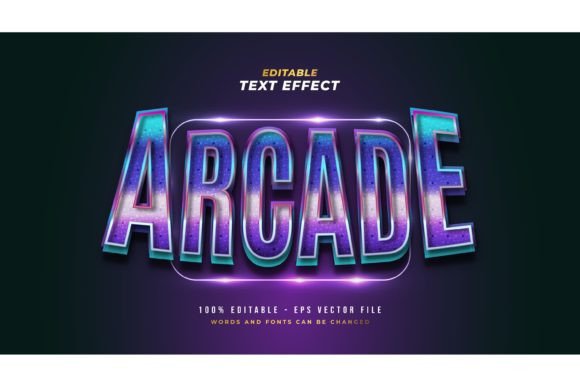
There’s a specific kind of nostalgia that hits you when you hear the 8-bit startup sound of a classic arcade machine. It’s a feeling of excitement, challenge, and vibrant energy. In the design world, capturing that specific retro aesthetic without looking dated is a delicate balancing act. This is where the Arcade Game Editable Text Effect steps in. It bridges the gap between the pixelated past and the high-definition present, offering a specialized tool for Adobe Illustrator users who want to inject personality into their typography without spending hours layering gradients and bevels.
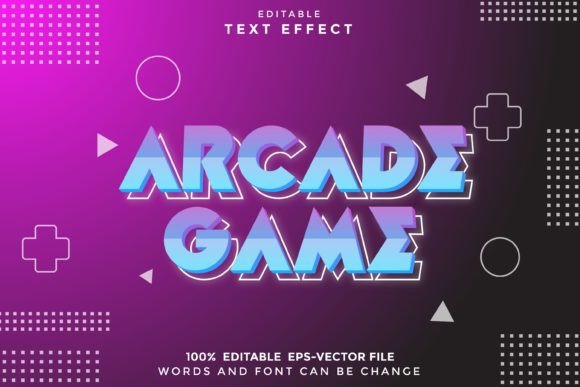
For designers, marketers, and small business owners, typography is often the silent ambassador of a brand. However, standard fonts—whether they are classic serif fonts or clean sans serif options—sometimes fail to convey the high-energy vibe required for specific campaigns. This effect isn't just a static image; it is a fully editable typography solution that transforms standard text into a visual event. It mimics the plastic, glossy, and illuminated look of classic cabinet displays, making it an essential asset for anyone looking to create impactful visual communication.
The Power of Fully Editable Typography
One of the biggest frustrations in design asset management is rigidity. You buy a premium font or a text effect, only to realize you cannot change the color, the kerning, or the underlying letterforms. The Arcade Game Editable Text Effect solves this by operating as a live effect within Adobe Illustrator. Because it works with every font or shape you load into the software, it acts as a universal filter for creativity.
This flexibility is crucial for maintaining visual consistency across a brand identity. Imagine you are a content creator or a small business owner launching a new product line. You might need a specific typeface to match your existing logo design, but you want to add that "retro-gamer" flair for a limited promotion. With this tool, you don't have to compromise your brand guidelines. You simply apply the effect to your chosen typeface, instantly transforming a modern typography choice into a thematic masterpiece. The result is a cohesive look that respects your established brand while adapting to a specific marketing moment.
Practical Applications for Visual Storytelling
The versatility of this design asset extends far beyond simple logo creation. Its scalability to any size means it is just as effective on a massive poster as it is on a favicon or a social media graphic. Here is how different professionals can leverage this style:
- Branding and Logo Design: For businesses in the tech, entertainment, or novelty food sectors, this effect can turn a standard wordmark into a memorable logo. It signals fun and interactivity immediately.
- Packaging Design: If you are designing for a snack brand, a toy company, or a craft beer with a gaming theme, the glossy, illuminated look of this text effect grabs attention on crowded shelves. It creates an immediate emotional connection with the consumer.
- Social Media Graphics: Algorithms favor engagement, and nothing stops a scroll like high-contrast, vibrant text. Using this effect for sale announcements, "Game Over" style memes, or event invitations can significantly boost click-through rates.
- Editorial Layouts and Magazines: Editors can use this for pull quotes or section headers to break the monotony of body text. It adds a tactile, visual element to digital publications and print materials alike.
- Merchandise and Invitations: From T-shirts and mugs to birthday party invitations, the retro aesthetic is perennially popular. The ability to edit the text means you can personalize merchandise for specific niches or events effortlessly.
Strategic Typography: Readability and Recognition
While the aesthetic appeal is obvious, strategic application requires an understanding of readability and audience engagement. The Arcade Game Editable Text Effect is a display font style tool, meaning it is designed for impact rather than long-form reading. It works best for headlines, sub-headers, and call-to-action buttons.
When incorporating this into your design assets, consider the hierarchy of information. Your primary message should be the one wearing the effect, while supporting information should use a clean, readable sans serif or serif font. This contrast creates a visual rhythm that guides the viewer’s eye.
Furthermore, testing is key. Because this effect adds depth, shadow, and highlights to your text, ensure that the background of your design doesn't clash. High-contrast backgrounds usually work best to let the "glow" of the arcade effect pop. Review the included styles and experiment with different color combinations within Illustrator to see how the gradients interact with your specific brand palette. Always check for commercial licensing if you plan to use the designs for client work or merchandise sales to ensure full compliance.
Streamlining Your Creative Workflow
Time is a non-renewable resource for entrepreneurs and designers. The technical process of manually creating 3D text effects in Adobe Illustrator—managing layers, light sources, and perspective—can take hours. This EPS file format solution streamlines that workflow. It allows you to focus on the creative direction rather than the technical execution.
Whether you are a hobbyist crafting a poster for a local gaming tournament or a marketing professional launching a digital campaign, the ease of use cannot be overstated. It integrates seamlessly into existing projects, allowing for rapid prototyping and iteration. By using this effect, you elevate the professionalism of your presentation, signaling to your audience that you pay attention to the details of visual communication.
Ultimately, the Arcade Game Editable Text Effect