Mobile Game GUI Pack 08: Streamline Your Game's Interface Design
Developing a mobile game is an intense balancing act between code, narrative, and visual design. While gameplay mechanics are the engine, the user interface is the steering wheel and dashboard. If your players can't navigate menus easily, read stats clearly, or feel immersed by the visual style, they are likely to churn. That is why having a robust, flexible, and high-quality asset library is not just a luxury—it is a necessity for modern game development. When you are working against a deadline or managing a tight budget, starting the GUI design from scratch can be a major bottleneck.
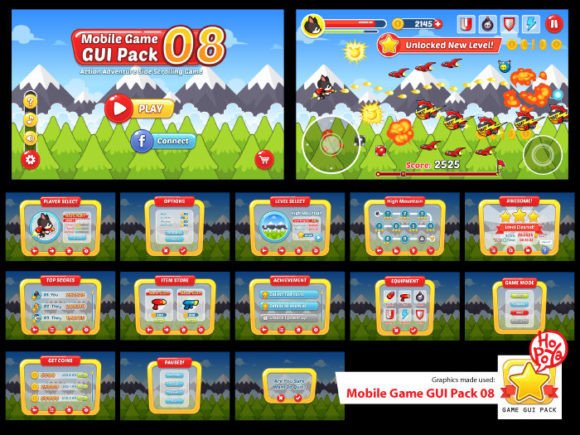
This is where a comprehensive resource like the Mobile Game GUI Pack 08 changes the workflow. It is designed specifically to solve the friction points of 2D interface design, offering a cohesive visual language that can be adapted to various game genres. Whether you are building a puzzle game, a strategy RPG, or a casual arcade experience, having a set of pre-designed, yet fully customizable elements allows you to focus on what makes your game unique rather than spending hours drawing buttons and window borders.
The Anatomy of a Flexible Game Interface
What makes a GUI pack truly useful is not just the number of assets, but the quality and editability of those assets. The Mobile Game GUI Pack 08 includes over 40 customizable buttons, which is the backbone of any game interface. Buttons are the primary call-to-action in a game; they start the level, pause the action, confirm purchases, and navigate settings. With five different color variations included, you can easily code your UI to communicate different meanings—green for positive actions, red for destructive or cancel actions, and neutral tones for general navigation.
Beyond buttons, the pack provides customizable windows and game elements. This is crucial for maintaining visual consistency across your app. A mismatched dialogue box or a health bar that looks out of place can break the immersion. By using a unified set of vectors, you ensure that every pop-up, notification, and HUD element feels like part of the same world. The inclusion of vector AI and EPS files means you are not locked into a static resolution. You can scale these assets for high-DPI mobile screens or even adapt them for tablet interfaces without losing crispness.
Integrating the PoetsenOne Font
Typography in games serves a dual purpose: it must be legible, and it must convey tone. The Mobile Game GUI Pack 08 utilizes the PoetsenOne typeface. This is a bold, rounded sans serif font that exudes a friendly and approachable vibe. It is an excellent choice for mobile gaming because rounded typography is generally easier to read on smaller screens and feels less aggressive than sharp, geometric fonts.
Using a premium font like PoetsenOne helps with brand recognition. If your game relies on a playful, energetic aesthetic—think of titles like *Candy Crush* or *Angry Birds*—this font fits perfectly. However, matching typography to project goals is vital. If you are making a gritty sci-fi shooter, you might want to use PoetsenOne for the tutorial text or menu headers but pair it with a different, more industrial display font for the logo. The beauty of having the font files included is that you can test these pairings directly within your engine.
Practical Applications Beyond the Game Engine
A common misconception about game assets is that they can only be used inside the game itself. In reality, the Mobile Game GUI Pack 08 is a versatile set of design assets that can support your entire marketing ecosystem. When you launch a mobile game, you aren't just releasing software; you are launching a brand. You need a consistent brand identity across your website, social media, and app store listings.
Consider your social media graphics. You can use the window elements and buttons from the pack to create engaging "Update Notes" images for Instagram or Facebook. The transparent PNG files allow you to overlay these UI elements onto screenshots of your gameplay seamlessly. This creates a professional look that tells users, "This is a polished product," before they even download it.
Furthermore, these assets are valuable for packaging design if you plan to sell merchandise like stickers or posters. The vector files ensure that your designs will print sharply at any size. For web design, you can use the buttons and frames to style the landing page for your game, ensuring that the look and feel of the website match the in-game experience perfectly. This continuity builds trust with potential players.
Optimizing for Readability and Engagement
One of the biggest challenges in mobile game design is readability. Users are often playing in bright sunlight or glancing at their screens quickly. The Mobile Game GUI Pack 08 addresses this by offering high-contrast elements. The bold nature of the included assets ensures that critical information—like "Game Over" or "Level Up"—is instantly recognizable.
When using these assets, keep readability considerations in mind. Even with a great font like PoetsenOne, text needs breathing room. Ensure that your windows have enough padding around the text so that it doesn't feel cramped. Use the different button colors to guide the user's eye. For example, if you have a main menu with three options, make the "Play" button the most vibrant color and keep the "Settings" or "Quit" buttons more subdued. This visual hierarchy helps players navigate intuitively, improving the overall user experience.
Technical Flexibility for Developers and Designers
The inclusion of AI, EPS, and PNG formats in the Mobile Game GUI Pack 08 speaks to a professional workflow. For designers using Adobe Illustrator or Affinity Designer, the vector files allow for total control over the modern typography and shapes. You can change the corner radius of buttons, alter the gradient of windows, or completely recolor the palette to match your specific game's color theory.
For developers, the transparent PNGs are ready to slice and import into engines like Unity, Unreal, or Godot. This saves significant development time. Instead of waiting for a designer to export assets, the developer can implement the UI logic immediately. This parallel workflow—where design and development happen simultaneously—is a massive advantage for indie teams and small studios.
Commercial Licensing and Project Scope
When selecting assets for a commercial product, understanding the license is as important as the visual quality. Most commercial font licenses and asset packs allow for use in end-products for sale, but it is always best practice to review the specific terms included with the pack. Whether you are creating a free-to-play game with in-app purchases or a premium paid app, ensuring your design assets are cleared for commercial use protects your business down the line.
This pack is an investment in quality. While free assets are available, they often lack the cohesion and scalability of a curated pack. Using a disjointed collection of free buttons and fonts can make your game look amateurish, which can hurt conversion rates. A cohesive pack like this provides the professional presentation needed to compete in the crowded app stores.
Final Thoughts on Streamlining Your Workflow
Creating a successful 2D mobile game requires a focus on the player experience. The interface should be invisible when it works well—intuitive and non-intrusive—and glaringly obvious when it fails. By utilizing a resource like the Mobile Game GUI Pack 08, you are effectively outsourcing the heavy lifting of UI design to a professionally crafted template that you can customize.
From the versatility of the vector files to the friendly legibility of the PoetsenOne font, every element is designed to help you build faster and better. Whether you are a solo developer bootstrapping your first title or a small studio looking to standardize your visual communication, this pack provides the building blocks for a polished, engaging, and professional game interface. It’s about removing friction from the creative process so you can ship a game that players love to look at and play.